Planning a gliding task
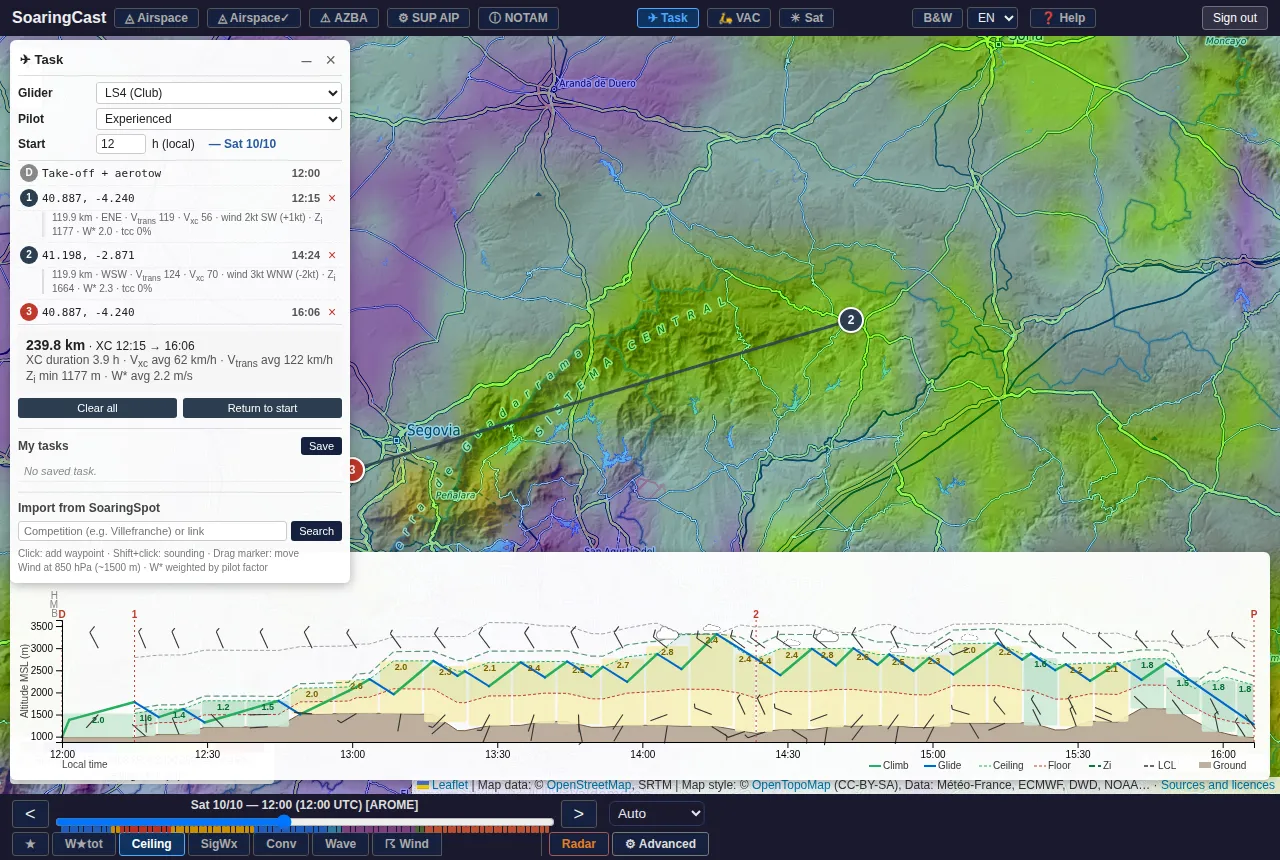
The ✈ Task button draws a task. SoaringCast simulates the flight with the forecast weather along the route, and shows the expected speed and timing.
- Click on the map: adds a turnpoint. Drag it to move it.
- Shift + click: opens the sounding at that point without adding a turnpoint.
- Return to start closes the loop; Clear all starts over.
- Glider, Pilot (novice, experienced, champion) and Start time adjust the simulation.
- My tasks: save a task to find it again later.
- Import from SoaringSpot: search for a competition to load the day's task.
The flight profile, at the bottom, shows the terrain, the usable band between floor and ceiling, cumulus, climbs (green) and glides (blue), then the final glide. A cow 🐄 marks a likely outlanding. Move the cursor along the profile to follow the glider on the map.
Create an account to access the map, soundings and the dashboard.
Create an account